FAQs
Here you can consult the answers to the most frequently asked questions regarding Open Badges and use of the Badges received
It is a digital object that certifies the skills acquired by people in all educational and experiential contexts.
Lo standard infrastrutturale aperto (OBI) ideato da Mozilla Foundation, gli conferisce la speciale caratteristica di poter supportare dati e informazioni ricche di contenuti utili per identificare il badge e qualificare le persone che lo ricevono. Non solo immagini quindi, che rappresentano la parte esterna e visibile del badge, ma anche un'infrastruttura interna; per cui, grazie alla sua "anatomia", l'Open Badge è:
Lo standard infrastrutturale aperto (OBI) ideato da Mozilla Foundation, gli conferisce la speciale caratteristica di poter supportare dati e informazioni ricche di contenuti utili per identificare il badge e qualificare le persone che lo ricevono. Non solo immagini quindi, che rappresentano la parte esterna e visibile del badge, ma anche un'infrastruttura interna; per cui, grazie alla sua "anatomia", l'Open Badge è:
- Evidence based: it contains data and information capable of objectifying its contents
- Archiveable: badges can be collected and stored online
- Transportable and transferable as it is interoperable: the badges together with the data and information they contain can be shared online and on the main social networks
Issuers are all those who carry out training activities and wish to enrich the value of the result of their activity through the creation and issuance of IQC digital badges for the digital representation of knowledge, skills and competences acquired by people in different training and experiential contexts.
The issuer can then design, create and issue digital badges to users, share them for promotional purposes on the main social networks, on newsletters, on the company website and in the CBox C-City.
Click here to find out who our issuers are.
The issuer can then design, create and issue digital badges to users, share them for promotional purposes on the main social networks, on newsletters, on the company website and in the CBox C-City.
Click here to find out who our issuers are.
Being qualified as an IQC Issuer allows you to create and issue digital badges, in compliance with the process and content requirements recommended by the Guideline which is the result of the work of the Digital Badge Stakeholders Table (D.B.S.T.).
The Issuer can independently manage the C-BOX platform having signed a user license agreement with IQC, or can entrust IQC with the creation and issuance of digital badges in its place by signing a badging service contract.
IQC Qualified Issuers receive the PDT C-BOX Issuer certificate personalized on their badge use characteristics.
The Issuer can independently manage the C-BOX platform having signed a user license agreement with IQC, or can entrust IQC with the creation and issuance of digital badges in its place by signing a badging service contract.
IQC Qualified Issuers receive the PDT C-BOX Issuer certificate personalized on their badge use characteristics.
The Digital Badge Stakeholder Table (D.B.S.T.) set up by IQC brings together representatives of interested parties with the aim of identifying a reference model for the representation, validation and digital recognition of skills.
Click here to find out more.
Click here to find out more.
The D.B.S.T. has identified 5 types of badges. Each of them is distinguished by graphics and internal content structure depending on the application area.

Open Badge: Attesta la partecipazione ad eventi collettivi. Definisce i criteri di partecipazione stabiliti e può includere prove del coinvolgimento attivo dei partecipanti. Ideale per webinar, fiere, congressi, eventi associativi.
Competence Badge: Attesta i risultati di attività svolte in contesti di apprendimento formale, non formale e informale. Include una descrizione completa delle conoscenze, abilità e competenze sviluppate, arricchite da evidenze del progresso individuale. Ideale per tutti i tipi di formazione.
Job Description Badge: Definisce un profilo professionale o un ruolo organizzativo specifico. Descrive compiti, responsabilità, standard etici e comportamentali relativi al ruolo, e ne dettaglia conoscenze, abilità e competenze. Ideale per consolidare la conoscenza organizzativa e standardizzare ruoli e responsabilità.
Functional Recollection Badge : Raccoglie e valorizza competenze ed esperienze documentate anche attraverso altri badge. Ideale per l'orientamento e il ricollocamento professionale.
Soft Skills Badge: Identifica e attesta competenze comportamentali chiave, come leadership o comunicazione, basate su framework riconosciuti a livello internazionale.
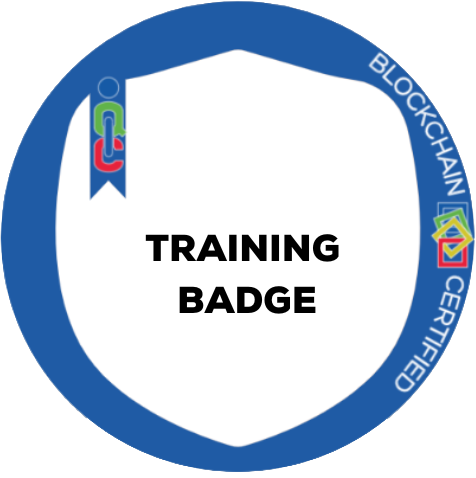
Training Badge: Attesta abilità pratiche acquisite sul campo attraverso una descrizione dettagliata delle conoscenze apprese e delle abilità sviluppate. Ideale per stage, tirocini ed esperienze lavorative brevi.

It is a consortium that defines the technological standards of EdTech solutions at an international level and verifies their correct application, so as to ensure interoperability.
CBox is the first platform in Italy to have obtained the 1EdTech Open Badge v2.0 certification, to guarantee the interoperability of badges: they can in fact be managed, understood, hosted and shared by all social networks and platforms that make use of digital badge.
IQC is a 1EdTech supporting member and is part of the 1EdTech Europe Leadership Board, whose members are 18 and the countries represented to date are Sweden, Norway, Spain, the Netherlands and Italy.
CBox is the first platform in Italy to have obtained the 1EdTech Open Badge v2.0 certification, to guarantee the interoperability of badges: they can in fact be managed, understood, hosted and shared by all social networks and platforms that make use of digital badge.
IQC is a 1EdTech supporting member and is part of the 1EdTech Europe Leadership Board, whose members are 18 and the countries represented to date are Sweden, Norway, Spain, the Netherlands and Italy.
It is the final recipient of the digital badges issued by the Issuers. Users who receive IQC digital badges are allowed to accept and view the badge acquired, store it in their personal space (backpack) on the platform, decide whether to share the badge on the main social networks and on the Human Capital Competence public page, insert it as a certification on Linkedin, integrate it into their Digital CV and insert it at the bottom of emails.
It is the public space on the CBox platform that collects the offer of badges created by the Issuers, so as to give visibility to all users (even those not registered on the platform).
The visitor to the page, through a semantic search engine, can search for a specific badge of interest and possibly request more information from the Issuer who published it.
Click here to visit the C-City page
The visitor to the page, through a semantic search engine, can search for a specific badge of interest and possibly request more information from the Issuer who published it.
Click here to visit the C-City page
The badges acquired by people who decide to share them can be hosted in this public space of the CBox.
platform. Thanks to the semantic search engine, it is possible to search for profiles of competent people with whom to establish contacts of a professional and collaborative nature.
Click here to visit the Human Capital Competence page
platform. Thanks to the semantic search engine, it is possible to search for profiles of competent people with whom to establish contacts of a professional and collaborative nature.
Click here to visit the Human Capital Competence page
The code is only used for the first access and can be found within the first e-mail, at the end of the same, with which you were notified of obtaining the badge.
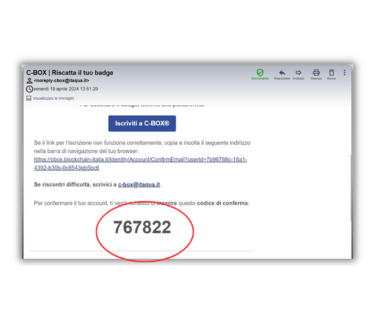
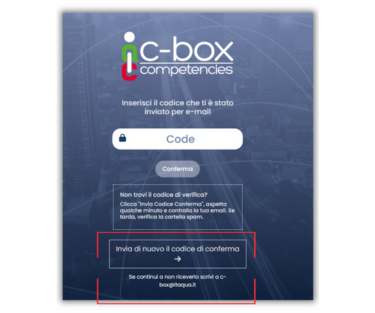
If you can't find this email or need a new code, you can request it during the registration process by selecting the 'Send a new confirmation code' option.
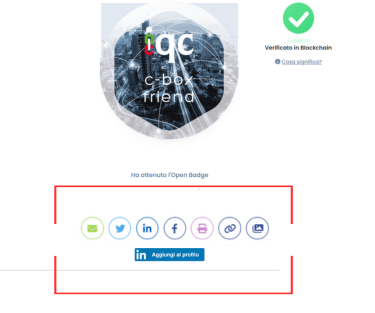
To share your Digital Badge, you must first register on the C-Box® platform. After logging in, visit the 'Badge Management' section and click on the graphic image of the badge you wish to share. A new screen will open with several sharing icons available. Select the icon of the social network on which you want to share your Digital Badge to proceed.
To associate several emails with your C-Box® account, you must first identify the primary email on which to converge all the badges and one or more secondary emails to be linked to the main one. If the main account does not yet exist, create it.
Next, follow these steps:
Next, follow these steps:
- Eliminazione dell'e-mail secondaria:
- Log in to C-Box® using the secondary email address
- Go to 'Account Settings', select 'Privacy & Data' and then 'Delete Account'. Confirm the deletion by entering your password. - Log in to C-Box® with your primary email.
- Go to 'Account Settings' and select '@Email Associate'
- Enter the secondary email address you wish to associate in the 'Associate New Email' field and click on 'Add Email'
- You will receive a confirmation code on the email you are associating (also check your spam box).
- Enter the code in the field provided and click on 'Confirm'
- Once the code is validated, you will see a screen confirming successful pairing
Users who receive badges can add them in the ceritifications field within their Linkedin profile.
Find out how to do it by downloading the guide.
Find out how to do it by downloading the guide.
Did not find the answer you were looking for?
Contact us!